What App Usability Testing Covers
Most people who search for app testing mean one of three things, and the answers are different.
| What they mean | The question | Method |
|---|---|---|
| QA and bug testing | Does every feature work, on every device and in every state? | Scripted tests, device labs, beta testers |
| Usability testing | Can a new person understand the app and reach a result? | Observed tasks with real or synthetic users |
| Performance and security testing | Is it fast, stable and safe under load? | Load, monitoring and security tools |
This guide covers the second. It matters because an app can pass every QA check and still lose a new user in the first minute. A working feature that nobody can find or understand is, to that user, not working.
SynthTest runs in a real browser, so it covers anything that runs in one: web apps, SaaS products, progressive web apps and mobile websites at phone size, with touch style input. It does not test native apps installed from an app store.
Why The First Session Decides Everything
For a web app or SaaS product, a new user passes through the same sequence, and each step can lose them:
- The landing pageDo they understand what the app does and who it is for?
- Sign-upIs the form short, the promise clear and the cost of trying it obvious?
- SetupDoes onboarding lead somewhere, and can they leave it and come back?
- The first real taskDo they reach a result that shows the value, and do they understand what they got?
- The second goalDoes the first success carry over, or was it a one trick demo?
Each step is a place to test. The most common finding in our experience is not a bug. It is a point where the app expects the user to know something they do not yet know.
What To Test In An App
- Sign-up and sign-in. Required fields, error messages, and what a returning customer sees.
- Onboarding. Whether every step can fail gracefully and whether there is a way out.
- The empty state. What a new user sees when there is no data yet.
- The first task, end to end. From the first click to a usable result.
- Pricing and upgrade prompts. Whether they appear at a sensible moment and say what they include.
- Phone use. The same flow with a thumb, a small screen and an interrupted session.
An Example From A Real Run
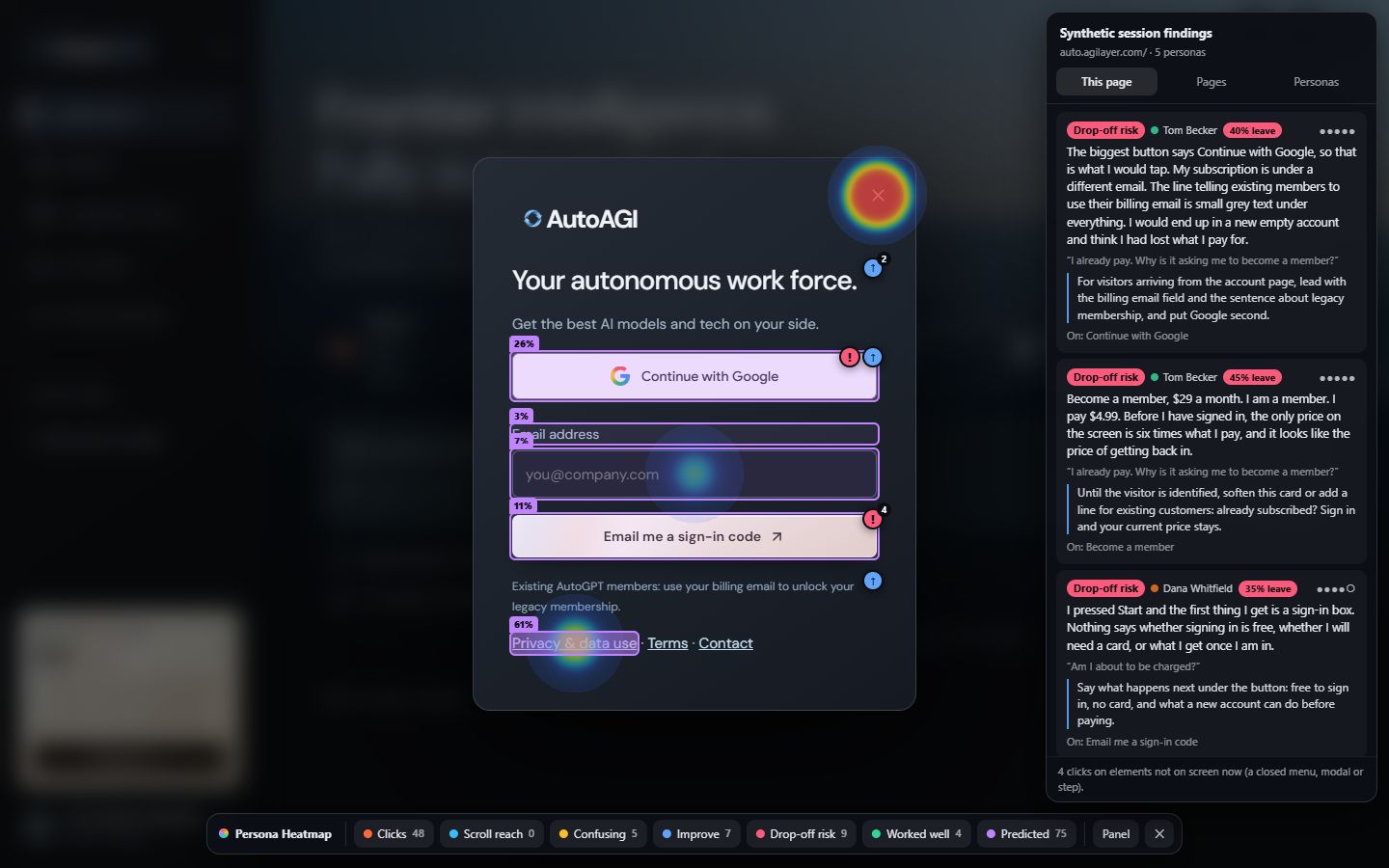
When five personas tested AutoAGI, an AI work platform, from the public site through sign-up and a first real task, three of them hit the same failure on the final setup step: a spinner for about fifty seconds, then a message that suggestions needed another attempt, with no reason and no way forward. Another persona, an existing customer, saw a membership price on the sign-in screen six times what they already paid. AutoAGI shipped fixes for the five highest ranked findings the day the report finished.
How To Run An App Usability Test
- Choose the first session as the scopeLanding page to first result, plus one second goal.
- Define two or three kinds of userDifferent reasons for using the app, different skill levels and at least one on a phone.
- Prepare accounts and guard railsThrowaway accounts with enough trial or credit to finish. A list of actions never to take, such as a live payment.
- Observe each user work aloneReal or synthetic, note every pause, wrong turn and dead click.
- Rank by agreementA problem several testers hit comes before one a single tester raised.
- Fix the top few and retestSmall rounds beat one big one.
The Nielsen Norman Group's guidance of about five users per distinct audience applies here too.
Testing An App With Synthetic Users
Recruiting people to use an unfinished app is slow, and testers need accounts and credit to get through it. Synthetic user testing gives you a faster first read. AI personas built around your customer segments sign up, set up and try a first real task in a real browser, and the test records their clicks and reactions. You get a heat map and a ranked list of findings with fixes.
It is well suited to apps built quickly, including with AI builders, where the step of a new person trying the product often gets skipped. It is not a replacement for real users on the findings that matter. Personas are more patient than people and cannot tell you what a real person feels.
What You Should Get Back
Findings tied to a screen and an element, ranked, with how many testers hit each one and a suggested fix. We cover the structure in the guide to the website UX audit and report, and the same checklist applies to an app.
Test your app's first session. Personas tuned to your ideal users, a heat map and ranked fixes in 24 to 48 hours.
Order A TestFrequently Asked Questions
What Is App Usability Testing?
It is a research method that checks whether people can use an app to do what they came to do. A tester is given a realistic goal, such as setting up an account and completing a first task, and an observer records where they hesitate, make mistakes or give up.
What Is The Difference Between App Testing And App Usability Testing?
App testing usually means QA: checking that features work, across devices and conditions, and finding bugs. App usability testing checks whether a person can understand and use those features. An app can pass every QA check and still lose users in the first session.
Can You Test A Mobile App With Synthetic Users?
It depends on the kind of app. A synthetic user test runs in a real browser, so it covers web apps, SaaS products, progressive web apps and mobile websites at phone size, with touch style input. It does not cover native apps installed from an app store.
How Do You Test An App That Needs A Login?
Provide throwaway test accounts, one per tester, with enough free trial or credit to finish the task. Never use real customer accounts or data. For anything involving payment, use the payment provider test mode on a staging site.
What Should I Test First In My App?
The first session: landing page, sign-up, setup and the first real task. Most apps lose the most users before the new user sees any value. Then test the second goal, which shows whether the first success carried over.
How Many Testers Do I Need For An App?
About five per distinct type of user, then test again after fixing. Give each tester a different reason for using the app, since people with the same goal tend to find the same problems.