What A Website UX Audit Is
A UX audit is a structured evaluation of a website or app. Baymard Institute describes it as a structured evaluation designed to uncover usability issues that may be hurting performance. You are looking for what stops a visitor from understanding the site, finding what they need or finishing the task they came for.
Audits and usability tests are related but not the same. An audit examines the site against principles and data. A usability test watches people use it. The most useful audits combine both: evidence of what people did, read against what is known to work.
- The report is the product. Judge an audit by what is in the report.
- Every finding needs a page, an element, evidence, a severity and a fix.
- Rank by severity, by how many testers hit it and by effort to fix.
- Be wary of any score with no evidence behind it.
Types Of UX Audit
| Type | Based on | Strength | Limit |
|---|---|---|---|
| Expert heuristic review | A specialist's judgment against usability principles | Fast, structured, experienced | One person's opinion. Not observed behavior |
| Analytics audit | Funnels, drop-off and session recordings | Real behavior at scale | Needs traffic. Shows where, not why |
| Usability test audit | Real users attempting tasks | Direct evidence of why | Slow and costly to recruit |
| Automated score | A tool grading pages on fixed checks | Instant and cheap | Rarely says why a person would stall |
| Synthetic user audit | AI personas using the live site in a real browser | Behavioral findings with no recruiting or traffic | Not real people. Confirm key findings |
What A Good Audit Report Contains
Whatever method produced it, these are the parts that make a report something you can act on.
- Scope and methodWhat was reviewed, by whom or what, and for which goals. Without this you cannot judge the findings.
- A summaryHow many findings, of which types, and the handful that matter most.
- Findings, each with evidenceThe page, the element, a screenshot and the observation in plain words.
- Severity and agreementHow serious each one is and how many testers or reviewers hit it.
- A recommended fix per findingSpecific enough that a designer or developer can start without a meeting.
- What workedThe things to protect during a redesign.
- Raw evidenceScreenshots, recordings or click data behind the findings, so you can check the work.
- LimitsWhat the method cannot tell you.
What A Finding Looks Like
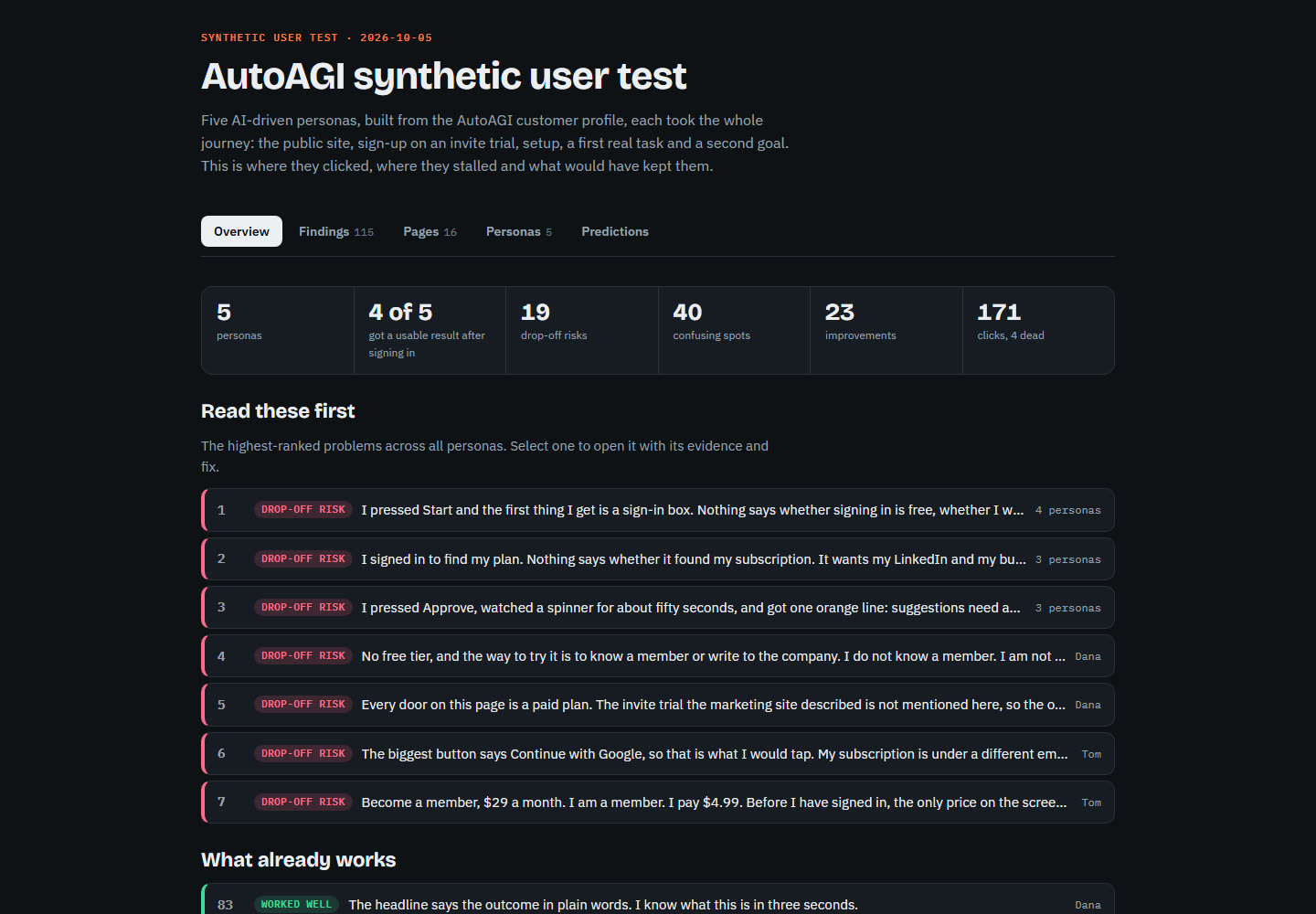
This is a real finding from a SynthTest report on AutoAGI, an AI work platform, from a persona who was an existing customer.
“Become a member, $29 a month. I am a member. I pay $4.99. Before I have signed in, the only price on the screen is six times what I pay.”
Tom Becker, a long-time customer, on the sign-in wall. A synthetic persona.
The report pins that to the element, records that it was a drop-off risk, and attaches the fix: until the visitor is identified, soften the card or add a line for existing customers. That is the shape to look for: an observation in the persona's words, the place it happened and a fix someone can ship.
How To Rank The Findings
A long list of findings does nothing until it is ordered. Score each one on three questions.
- How severe is it? A dead end on the main path outranks a wording tweak.
- How many hit it? A problem three of five testers hit comes before one a single tester raised. See the evidence levels in the synthetic user testing guide.
- How hard is it to fix? A one line change that removes a dead end goes this afternoon.
Start with severe, widely shared, cheap fixes. Then fix severe, widely shared, expensive ones. Leave the cosmetic and single-tester items for last, or test them.
From Report To Fixes
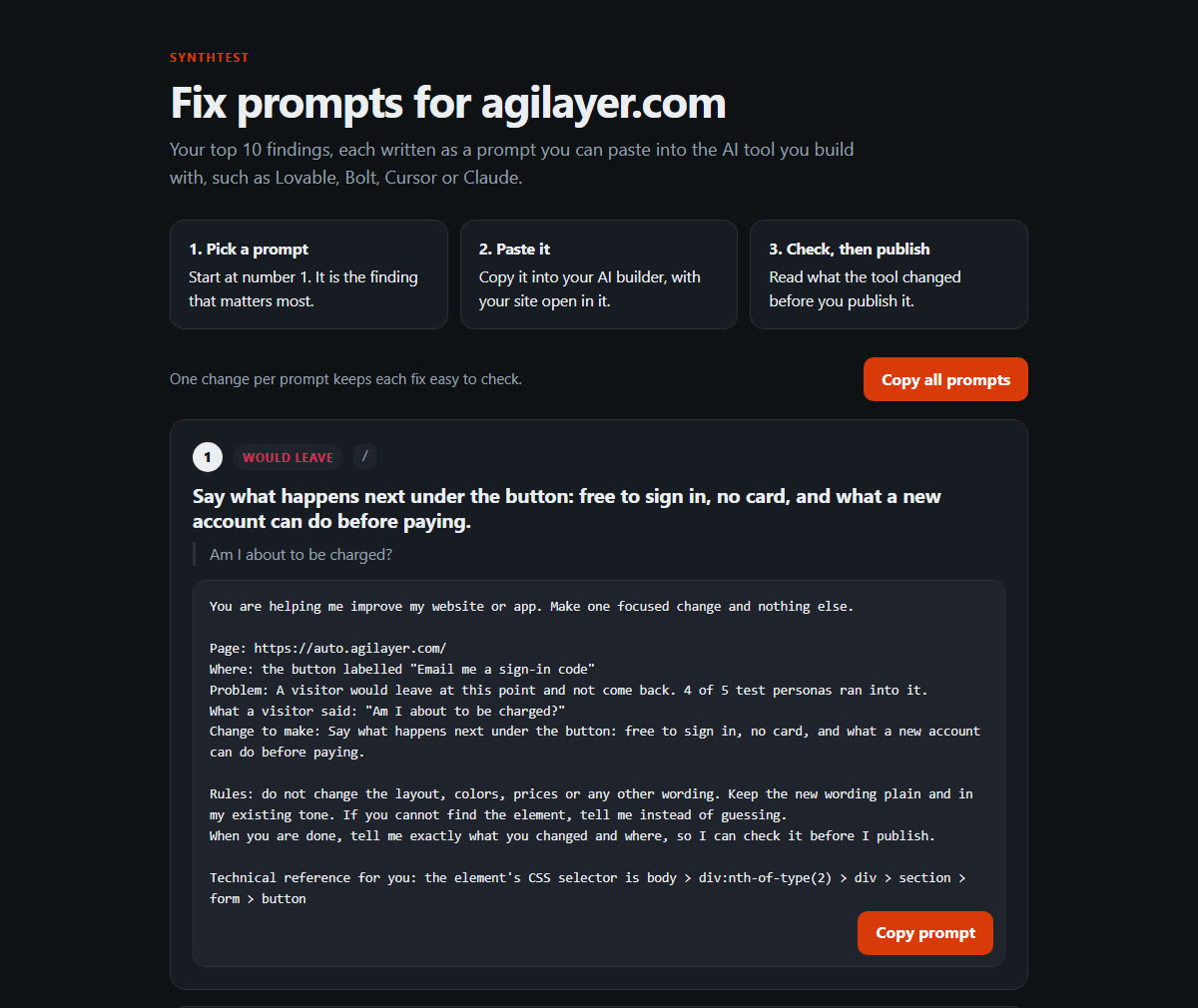
A report that stops at the problem leaves the work to you. The useful ones close the loop. In a SynthTest report, the top ten findings are also written as prompts you can paste into the AI tool you build with, such as Lovable, Bolt, Cursor or Claude. Each asks for one change and tells the tool to explain what it changed, so you can check it before you publish.
Getting A Synthetic User Audit
A synthetic user test produces an audit report from observed behavior. Personas built around your customer segments use your live site in a real browser toward a goal. You receive a heat map drawn on screenshots of your own pages, ranked findings with fixes, a PDF, a private web report and every screenshot and click as evidence.
It is a fast, evidence-based first audit. It does not replace real users on what matters most, and the personas are synthetic, which every report says plainly. See also website usability testing and app usability testing.
See what the report looks like for your site. A heat map, ranked findings and fixes in 24 to 48 hours.
Order A TestFrequently Asked Questions
What Is A Website UX Audit?
A UX audit is a structured evaluation of a website or app against usability principles, data and observed behavior, aimed at finding what hurts the experience and conversion. The output is a report of findings, ranked, with recommendations.
What Should A UX Audit Report Include?
Each finding should have a page and element, a screenshot, a severity, how many users or testers hit it, the evidence and a recommended fix. It should also show the scope, who or what did the evaluating and the limits of the method.
What Is The Difference Between A UX Audit And Usability Testing?
An audit reviews the site against principles and data, often by an expert. Usability testing watches users attempt tasks. Audits are faster, testing is more direct evidence. Many teams use an audit to decide what to test.
How Do I Prioritize UX Audit Findings?
Rank by how severe the problem is, how many people it affects and how easy it is to fix. A problem that blocks the main path and was hit by several testers goes first. A cosmetic issue raised once goes last.
Can AI Do A UX Audit?
AI can do part of one. A synthetic user test has AI personas use your live site and record where they stall, which produces behavioral findings with a heat map. It does not replace expert judgment on brand, accessibility with assistive technology or conversion data from real visitors.
How Often Should I Audit My Website?
Audit before launch, after a redesign and whenever you change pricing, sign-up or navigation. Between those, a quick test before each release catches regressions before customers do.